SystemParametersInfo ( SPI_SETSCREENSAVERRUNNING, TRUE, NULL, 0 );
Showing posts with label Windows API. Show all posts
Showing posts with label Windows API. Show all posts
Sunday, April 19, 2009
[VC++] Disabling Ctrl+Alt+Del key
Simplest way to disable the Ctrl+Alt+Del key press is to use the API SystemParametersInfo(). See the below code snippet.


Thursday, March 19, 2009
[VC++] Change cursor using SetClassLong()
You can use SetClassLong() function for changing/setting the cursor of your application. Here is how to do it.
SetClassLong( GetSafeHwnd(),Please make sure that cursor resource IDC_CURSOR1 is created and available in the .rc file.
GCL_HCURSOR,
(LONG)LoadCursor(AfxGetInstanceHandle(),
MAKEINTRESOURCE( IDC_CURSOR1 )));
Sunday, March 8, 2009
[VC++] Showing restart dialog
Simplest way to show a restart dialog is to use the API RestartDialog(). See how to do it !
RestartDialog( NULL, NULL, EWX_REBOOT );Please note that this function is available through Windows XP Service Pack 2 (SP2) and Windows Server 2003. It might be altered or unavailable in other versions of Windows.
Tuesday, March 3, 2009
[VC++] Finding logical drive letters using GetLogicalDriveStrings()
Below code demonstrates how to find the logical drive letters in your machine using API GetLogicalDriveStrings(). If executed the below code on finding each drive letter it will show a message box displaying the drive letter.
TCHAR tszDriveList[512];
TCHAR tszDrive [3*sizeof(TCHAR)];
// Get the logical drive strings
int nDriveStrLen = GetLogicalDriveStrings( sizeof( tszDriveList ), tszDriveList );
if( 0 != nDriveStrLen )
{
  // Parse the returned multi-string array.
  int nIdx = 0;
  while( 0 != tszDriveList[nIdx])
  {
     _tcscpy( tszDrive, &(tszDriveList[nIdx]));
     // Show the drive obtained
     AfxMessageBox( tszDrive );
     // Skipping index for getting the whole :\ with drive letter
     while( 0 != tszDriveList[nIdx] )
     {
         nIdx++;
     }
     nIdx++;
  }
}
[VC++] Finding executable filename for a document
You can find a document's executable file name and path using FindExecutable() API. For example if you want to know the executable file path of a *.doc file it will return winword.exe installed path. Below code demonstrate how to use this.
TCHAR wcsExecutablePath[MAX_PATH];
// Find Executable path of the document
if( 32 < (int)FindExecutable( _T( "C:\\Test.doc" ),// Document Name
                              NULL,                // Current working directory
                              wcsExecutablePath )) // Executable path returned
{
    // Show the executable path obtained
    AfxMessageBox( wcsExecutablePath );
}
[VC++] Open file dialog using GetFileNameFromBrowse()
You may be familiar with the File Open Dialog in application such as notepad, do you know how to make the same ? Its simple with a shell API GetFileNameFromBrowse() which is a wrapper of GetOpenFileName(). See the below code and see the appearance of the File open dialog in vista,
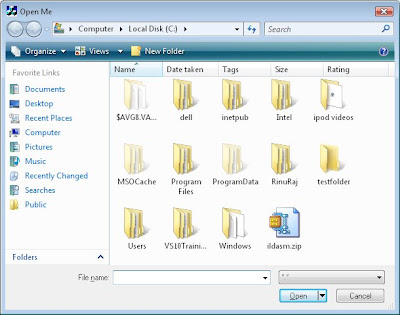
wchar_t wszFilepath[MAX_PATH] = L"C:\\";See the File Open dialog shown on excuting the above code
if( GetFileNameFromBrowse( GetSafeHwnd(),
wszFilepath, // Default File Path
MAX_PATH, // Size of file path
NULL, // Working Directory
NULL, // Default Extension
L"*.*", // Filters
L"Open Me" ))// Dialog Title
{
// Show user selected file name/path in a message box
MessageBox( CString( wszFilepath ));
}
[VC++] Getting Drive type using RealDriveType()
Do you want to know what type of a drive is corresponding an index, there is a shell function RealDriveType() which will help you figuring out the same. This function will take first parameter as the drive index, for example if you pass drive index 1 that corresponds to A: if you pass drive index 3 that corresponds to C: similarly it will go on. See the below function for demonstrating how to know the drive type. If you pass a drive index to this function then it will show message box displaying the drive type. For example if you pass 3 it will show message box saying "Fixed Drive".
void ShowDriveType( int nDriveIdx_i )
{
    int nDriveType = RealDriveType( nDriveIdx_i, 0 );
    switch( nDriveType )
    {
    case DRIVE_UNKNOWN:
        // This is an unknown drive
        AfxMessageBox( "Unknow drive type" );
        break;
    case DRIVE_NO_ROOT_DIR:
        // This is an Invalid root path
        AfxMessageBox( "Invalid root path" );
        break;
    case DRIVE_REMOVABLE:
       // This is a Removable Drive
        AfxMessageBox( "Removable Drive" );
        break;
    case DRIVE_FIXED:
        // This is a fixed drive
        AfxMessageBox( "Fixed Drive" );
        break;
    case DRIVE_REMOTE:
        // This is a Network Drive
        AfxMessageBox( "Network Drive" );
        break;
    case DRIVE_CDROM:
        // This is a CD/DVD Drive
        AfxMessageBox( "CD/DVD Drive" );
        break;
    case DRIVE_RAMDISK:
        // This is a RAM disk drive
        AfxMessageBox( "RAMDisk Drive" );
    default:
        break;
    };
}
Wednesday, February 25, 2009
[VC++] Extracting and using icon from other Applications
If you want to have your application using the icons of some other application in an easy way ExtractIcon() or ExtractIconEx() serves you the best. See the below code snippet demonstrating how to extract and use the icon of calculator as your application icon.
HICON hIcon;Do not forget to destroy the icon handle calling DestroyIcon(), when no longer needed.
// Extract icon of Windows Calculator
hIcon = ExtractIcon( AfxGetApp()->m_hInstance, "C:\\WINDOWS\\system32\\calc.exe", 0 );
// Set the extracted icon as the application's icon.
SetIcon( hIcon, FALSE );
Monday, February 23, 2009
[VC++] Map or Unmap network drive
Are you looking for a standard 'Map Network Drive' dialog for mapping a network resource as a local drive to your Computer ? Or you may be looking for ‘Disconnect Network Drives' dialog box for disconnecting network resource mapped as your local drive ? Here is how to show such dialogs for mapping or disconnecting network resources using two APIs WNetConnectionDialog() and WNetDisconnectDialog(),
Showing 'Map Network Drive' dialog box


Showing 'Map Network Drive' dialog box
// Show Map Network Drive dialog
DWORD dwNetConnectRes = WNetConnectionDialog( 0, RESOURCETYPE_DISK );
if( NO_ERROR == dwNetConnectRes )
{
    // successfully mapped the drive
}
else if( -1 == dwNetConnectRes )
{
    // User canceled
}
else
{
    // Mapping network drive failed
}
Above code when executed will display the 'Map Network Drive' dialog as shown below. For mapping a network resource press the Browse... button and select the network resource and press Finish.

Showing 'Disconnect Network Drives' dialog box
// Show Disconnect Network Drives dialogSee the below Disconnect Drives dialog displayed in my machine(with two network resources mapped already) on executing the above code. To disconect just select and press OK button.
DWORD dwNetDisConnectRes = WNetDisconnectDialog( 0, RESOURCETYPE_DISK );
if( NO_ERROR == dwNetDisConnectRes )
{
// successfully unmapped the drive
}
else if( -1 == dwNetDisConnectRes )
{
// User canceled
}
else
{
// Disconnecting network drive failed
}

For availing the above APIs you may need to incude header file winnetwk.h and link to mpr.lib.
Sunday, February 22, 2009
[VC++] Process Information with ZwQueryInformationProcess()
There is an undocumented native ZwQueryInformationProcess() API available in NTDLL.dll, with which we can get the process information such as process id, base priority, parent process id, affinity mask etc. Below code snippet shows how to use the same,
typedef structIn my previous post I have shown you how to get the parent process id by iterating through the processes and in the above code stProcessBasicInformation.pulInheritedFromUniqueProcessId represents the parent process id.
{
ULONG ulExitStatus;
PVOID pBaseAddress;
ULONG ulAffinityMask;
ULONG uBasePriority;
ULONG_PTR pulUniqueProcessId;
ULONG_PTR pulInheritedFromUniqueProcessId;
} PROCESS_BASIC_INFORMATION;
typedef ULONG (WINAPI * ZwQueryInformationProcess)( HANDLE ProcessHandle,
ULONG ProcessInformationClass,
PVOID ProcessInformation,
ULONG ProcessInformationLength,
PULONG ReturnLength );
// Load NTDLL
HMODULE hModule = LoadLibrary( "NTDLL.dll" );
// Get the ZwQueryInformationProcess() address
ZwQueryInformationProcess ZwQueryInformationProcessPtr = (ZwQueryInformationProcess)GetProcAddress( hModule, "ZwQueryInformationProcess");
PROCESS_BASIC_INFORMATION stProcessBasicInformation = { 0 };
if( ZwQueryInformationProcessPtr )
{
// Get the process handle
HANDLE hProcess = OpenProcess( PROCESS_ALL_ACCESS, FALSE, GetCurrentProcessId());
// Call the function
ZwQueryInformationProcessPtr(hProcess, 0, &stProcessBasicInformation, sizeof(stProcessBasicInformation), 0);
}
FreeLibrary( hModule );
Saturday, February 21, 2009
[VC++] Programmatically empty the Recycle Bin
Suppose in your program if you are in need of more disk space very first thing you can do is empty the recycle bin. There is a shell function SHEmptyRecycleBin() for emptying the recycle bin. Please see the below code snippet showing the usage.
// Empty Recycle bin.You can specify options such as do not show delete progress and do not make sounds specifying respective flags in the last parameter of the function. Specifying drive or folder path as the second parameter will remove only content deleted from those folders.
if( S_OK == SHEmptyRecycleBin( NULL,
NULL,
SHERB_NOCONFIRMATION ))
{
// Successfully emptied
}
Friday, February 20, 2009
[VC++] Changing your screen resolution programmatically
Here is how to change your screen resolution programmatically. For doing this you may need the assistance of two APIs,
- EnumDisplaySettings() - for getting the current graphics mode.
- ChangeDisplaySettings() - for setting the modified graphic mode.
DEVMODE stGraphicsMode;
// Retrieves the information of current display device
EnumDisplaySettings ( NULL, 0, &stGraphicsMode );
// Change the screen resolution
stGraphicsMode.dmPelsWidth  = 1280;
stGraphicsMode.dmPelsHeight = 1024;
stGraphicsMode.dmBitsPerPel = 32;
// Set the modifying items
stGraphicsMode.dmFields = DM_PELSWIDTH  DM_PELSHEIGHT  DM_BITSPERPEL;
// Change the display settings
if( DISP_CHANGE_SUCCESSFUL == ChangeDisplaySettings( &stGraphicsMode, CDS_FULLSCREEN ))
{
    //Successfully changed!
}
Monday, February 16, 2009
[VC++] Getting process name from Process ID
It is easy to obtain the process name from a Process ID.
- Open the process with Process ID using OpenProcess()
- Enumerate the loaded modules using EnumProcessModules()
- Take the first module handle retrieved in the previous step and get the module name using GetModuleBaseName()
See the below code executing the above steps and how to obtain the process name using PID.
HANDLE hProcess = OpenProcess( PROCESS_QUERY_INFORMATION|PROCESS_VM_READ,Include psapi.h and link psap.lib for getting these APIs. Above program when slightly modified can be used to obtain all the loaded modules by the process, for this you need to specify a HMODULE array to EnumProcessModules() and loop GetModuleBaseName() for each item of the HMODULE obtained.
FALSE, dwPID_i );
if( hProcess )
{
char szProcessName[MAX_PATH];
HMODULE hMod;
DWORD dwNeeded;
if( EnumProcessModules( hProcess,
&hMod,
sizeof(HMODULE),
&dwNeeded ))
{
if( GetModuleBaseName( hProcess,
hMod,
szProcessName,
sizeof( szProcessName )))
{
// Show the process name
MessageBox( szProcessName );
}
}
CloseHandle( hProcess );
}
Thursday, February 12, 2009
[VC++] Programmatically displaying properties dialog
Here is how to display the properties dialog programmatically.
SHELLEXECUTEINFO shExecuteInfo = { 0 } ;
shExecuteInfo.cbSize = sizeof ( shExecuteInfo ) ;
shExecuteInfo.fMask = SEE_MASK_INVOKEIDLIST ;
shExecuteInfo.lpVerb = "properties" ;
shExecuteInfo.lpFile = "C:\\WINDOWS\\system32\\notepad.exe" ;
ShellExecuteEx ( &shExecuteInfo ) ;
Above code when executed will display the properties dialog box of notepad(as shown below). Similarly we can display any folder or file properties by giving its path name to SHELLEXECUTEINFO::lpFile.

Sunday, February 8, 2009
[VC++] Getting your application's module name
You can get your application module name through any of the below ways,
Using CWinApp::m_pszExeName
// This will return the application name (applicable for MFC application only)
AfxGetApp()->m_pszExeName;
Using GetModuleFileName()
char szAppPath[MAX_PATH] = "";
CString csAppName;// Assuming CString is supported else use std::string or so
::GetModuleFileName(0, szAppPath, MAX_PATH);
// Extract application name
csAppName = szAppPath;
csAppName = csAppName.Mid(csAppName.ReverseFind('\\') + 1);
Using CWinApp::m_pszExeName
// This will return the application name (applicable for MFC application only)
AfxGetApp()->m_pszExeName;
Using GetModuleFileName()
char szAppPath[MAX_PATH] = "";
CString csAppName;// Assuming CString is supported else use std::string or so
::GetModuleFileName(0, szAppPath, MAX_PATH);
// Extract application name
csAppName = szAppPath;
csAppName = csAppName.Mid(csAppName.ReverseFind('\\') + 1);
Tuesday, February 3, 2009
[VC++] PathIsDirectory() PathIsDirectoryEmpty() PathIsExe() and more...
Let me call your attention to some interesting functions available for ease your job while handling various file/directory paths.
PathIsDirectory()
As the name suggest it will check given path is a directory or not (and return TRUE or FALSE respectively). See the below sample code,
As the name suggest it will check whether the given directory path is empty.
As the name suggest it will check whether the given path is a path to any of .cmd, .bat, .pif, .scf, .exe, .com, or .scrfile
PathIsContentType()
PathIsFileSpec()
PathIsHTMLFile()
PathIsLFNFileSpec()
PathIsNetworkPath()
PathIsPrefix()
PathIsRelative()
PathIsRoot()
PathIsSameRoot()
PathIsSlow()
PathIsSystemFolder()
PathIsUNC ()
PathIsUNCServer()
PathIsUNCServerShare()
PathIsURL()
PathIsDirectory()
As the name suggest it will check given path is a directory or not (and return TRUE or FALSE respectively). See the below sample code,
    if( PathIsDirectory( "C:\\Windows" ))
    {
        // Yes given path is a directory
    }
    else
    {
        // Not a directory
}PathIsDirectoryEmpty()As the name suggest it will check whether the given directory path is empty.
    if( PathIsDirectoryEmpty( "C:\\temp" ))
    {
        // Yes given directory is empty
    }
    else
    {
        // Not an empty directory
}PathIsExe()As the name suggest it will check whether the given path is a path to any of .cmd, .bat, .pif, .scf, .exe, .com, or .scrfile
    if( PathIsExe( L"C:\\WINDOWS\\system32\\autochk.exe" ))
    {
        // Yes given path is an executable file
    }
    else
    {
        // Not an executable file
    }
There are more similar functions available please refer MSDN if needed,PathIsContentType()
PathIsFileSpec()
PathIsHTMLFile()
PathIsLFNFileSpec()
PathIsNetworkPath()
PathIsPrefix()
PathIsRelative()
PathIsRoot()
PathIsSameRoot()
PathIsSlow()
PathIsSystemFolder()
PathIsUNC ()
PathIsUNCServer()
PathIsUNCServerShare()
PathIsURL()
[VC++] Programmatically locking your machine
For locking your machine programmatically you can use the API LockWorkStation(). See the below code for locking a system.
if( !LockWorkStation())
{
// Failed to lock the machine
}
Please note that _WIN32_WINNT should be defined >= 0x0500
if( !LockWorkStation())
{
// Failed to lock the machine
}
Please note that _WIN32_WINNT should be defined >= 0x0500
Sunday, February 1, 2009
[VC++] Getting your application's full file path name
For getting the path name to your application you can use GetModuleFileName() API. Below code snippet shows how to obtain the same and display the same in a messagebox !
TCHAR szModulePath[MAX_PATH];
GetModuleFileName( 0, szModulePath, MAX_PATH );
MessageBox( szModulePath );
TCHAR szModulePath[MAX_PATH];
GetModuleFileName( 0, szModulePath, MAX_PATH );
MessageBox( szModulePath );
Thursday, January 29, 2009
[VC++] Programmatically checking internet connection is active
You might have thought of how to check your internet connection in your program, here is how to check for internet connection programmatically. Following are the two functions of interest,
InternetGetConnectedState()
InternetCheckConnection ()
InternetGetConnectedState()
This function Retrieves the connected state of the local system. It Returns TRUE if there is an active modem or a LAN Internet connection. Below code snippet explains how to use the function.
DWORD dwFlags = 0;
if( InternetGetConnectedState ( &dwFlags, 0 ))
{
if( dwFlags & INTERNET_CONNECTION_OFFLINE )
{
// Connected but in offline mode
}
else
{
// Connection is active
}
}
else
{
// No connection
}
InternetCheckConnection()
InternetGetConnectedState() indicates that at least one connection to the Internet is available. It does not guarantee that a connection to a specific host can be established and InternetCheckConnection() function can be called to check if a connection to a specific destination can be established. Below code snippet may explain you the same.
if( InternetCheckConnection( "http://www.google.com", FLAG_ICC_FORCE_CONNECTION, 0 ))
{
// Connection to specified host exist
}
else
{
// Connection to specified host does not exist
}
InternetGetConnectedState()
InternetCheckConnection ()
InternetGetConnectedState()
This function Retrieves the connected state of the local system. It Returns TRUE if there is an active modem or a LAN Internet connection. Below code snippet explains how to use the function.
DWORD dwFlags = 0;
if( InternetGetConnectedState ( &dwFlags, 0 ))
{
if( dwFlags & INTERNET_CONNECTION_OFFLINE )
{
// Connected but in offline mode
}
else
{
// Connection is active
}
}
else
{
// No connection
}
InternetCheckConnection()
InternetGetConnectedState() indicates that at least one connection to the Internet is available. It does not guarantee that a connection to a specific host can be established and InternetCheckConnection() function can be called to check if a connection to a specific destination can be established. Below code snippet may explain you the same.
if( InternetCheckConnection( "http://www.google.com", FLAG_ICC_FORCE_CONNECTION, 0 ))
{
// Connection to specified host exist
}
else
{
// Connection to specified host does not exist
}
[VC++] Programmatically shutdown, restart or logoff
If you are in need of shutting down, restart or log off you system using your VC++ code, then here are two APIs which will do exactly what you think !
ExitWindowsEx()
InitiateSystemShutdownEx()
Following section demonstrate ExitWindowsEx() function for shutdown, restart & log off using ExitWindowsEx,
Shutdown
// Shutdown forcefully
if( ExitWindowsEx( EWX_SHUTDOWN EWX_FORCE, SHTDN_REASON_MAJOR_OPERATINGSYSTEM ))
{
// Successfully requested for shutdown
}
Restart
// Restart forcefully
if( ExitWindowsEx( EWX_REBOOT EWX_FORCE, SHTDN_REASON_MAJOR_OPERATINGSYSTEM ))
{
// Successfully requested for reboot
}
Log Off
// Logging off forcefully
if( ExitWindowsEx( EWX_LOGOFF EWX_FORCE, SHTDN_REASON_MINOR_HUNG ))
{
// Successfully requested for loging off
}
EWX_FORCE flag is responsible for forceful operation request. Second parameter of ExitWindowsEx() specify the reason of exiting windows, check here for more flags/options. If you need a much user friendly Shutdown/Restart/Log off operation with a timer and a dialog box that prompts the user to log off you can go for InitiateSystemShutdownEx().
ExitWindowsEx()
InitiateSystemShutdownEx()
Following section demonstrate ExitWindowsEx() function for shutdown, restart & log off using ExitWindowsEx,
Shutdown
// Shutdown forcefully
if( ExitWindowsEx( EWX_SHUTDOWN EWX_FORCE, SHTDN_REASON_MAJOR_OPERATINGSYSTEM ))
{
// Successfully requested for shutdown
}
Restart
// Restart forcefully
if( ExitWindowsEx( EWX_REBOOT EWX_FORCE, SHTDN_REASON_MAJOR_OPERATINGSYSTEM ))
{
// Successfully requested for reboot
}
Log Off
// Logging off forcefully
if( ExitWindowsEx( EWX_LOGOFF EWX_FORCE, SHTDN_REASON_MINOR_HUNG ))
{
// Successfully requested for loging off
}
EWX_FORCE flag is responsible for forceful operation request. Second parameter of ExitWindowsEx() specify the reason of exiting windows, check here for more flags/options. If you need a much user friendly Shutdown/Restart/Log off operation with a timer and a dialog box that prompts the user to log off you can go for InitiateSystemShutdownEx().
Subscribe to:
Posts (Atom)


 Posts
Posts