You may have tried renaming a file/folder with empty name but windows will never allow it. Here is a way to rename your folder.
1. Right click the file/folder and select Properties.
2. In the Properties dialog take General tab and delete the current name.
3. Keep the cursor in the name box, Press down Alt key and press 255 (from number pad)
4. Now press OK, selected file/folders name will be changed to empty.
5. If you use other combination such as 256, 257 etc with Alt key it will result in creating funny symbols as name of the file/folder.
I tell you there is a blank icon available with WINDOWS for setting blank icon for a folder. In the Customize tab, click Change Icon... and you can select empty icon and press Ok.
Tuesday, September 8, 2009


Friday, September 4, 2009
[Utility][WinDbg] !htrace for debugging handle leak
Windbg Debugger’s !htrace extension is very good at debugging handle leaks. See the below steps how you can do it.
1. Install Debugging Tool for windows from here.
2. Run WinDbg installed with Debugging Tools in Step 1.
3. Take File->Attach to a process... menu and select your application in the process list
4. Application will break and change in to debug mode
5. Take File->Symbol File path and add the path where your application's pdb file is available
6. In the debug prompt enter !htrace -enable and press enter.
7. Now take Debug->Go menu, then you can operate on your application
8. Now run your scenario where your application is assumed to have handle leak.
9. Now take Debug->Break menu, for changing the application to debug mode.
10. Now enter !htrace -diff in the debug prompt and press enter. Here it list the handle leak logs.
Below is an example of the log generated for 4 opened handle in my test app. From the log you can see where exactly the handle is leaked in the code.
0:001>
1. Install Debugging Tool for windows from here.
2. Run WinDbg installed with Debugging Tools in Step 1.
3. Take File->Attach to a process... menu and select your application in the process list
4. Application will break and change in to debug mode
5. Take File->Symbol File path and add the path where your application's pdb file is available
6. In the debug prompt enter !htrace -enable and press enter.
7. Now take Debug->Go menu, then you can operate on your application
8. Now run your scenario where your application is assumed to have handle leak.
9. Now take Debug->Break menu, for changing the application to debug mode.
10. Now enter !htrace -diff in the debug prompt and press enter. Here it list the handle leak logs.
Below is an example of the log generated for 4 opened handle in my test app. From the log you can see where exactly the handle is leaked in the code.
0:001>
!htrace -diff
Handle tracing information snapshot successfully taken.
0x26 new stack traces since the previous snapshot.
Ignoring handles that were already closed...
Outstanding handles opened since the previous snapshot:
--------------------------------------
Handle = 0x0000070c - OPEN
Thread ID = 0x00001758, Process ID = 0x00001248

0x7c8308eb: kernel32!CreateEventA+0x00000068
*** WARNING: Unable to verify checksum for D:\TestFolder\MiscTest\Release\MiscTest.exe
0x0040172b: MiscTest!CMiscTestDlg::OnButtonHandle+0x0000001a
0x73dd24c0: MFC42!_AfxDispatchCmdMsg+0x00000082
0x73dd23bf: MFC42!CCmdTarget::OnCmdMsg+0x0000010a
0x73e3dead: MFC42!CPropertySheet::OnCmdMsg+0x0000001d
0x73dd3244: MFC42!CWnd::OnCommand+0x00000053
0x73dd1bf1: MFC42!CWnd::OnWndMsg+0x0000002f
0x73dd1b9b: MFC42!CWnd::WindowProc+0x00000024
0x73dd1b05: MFC42!AfxCallWndProc+0x00000091
0x73dd1a58: MFC42!AfxWndProc+0x00000036
0x73e6847d: MFC42!AfxWndProcBase+0x00000039
--------------------------------------
Handle = 0x00000710 - OPEN
Thread ID = 0x00001758, Process ID = 0x00001248

0x7c8308eb: kernel32!CreateEventA+0x00000068
0x0040172b: MiscTest!CMiscTestDlg::OnButtonHandle+0x0000001a
0x73dd24c0: MFC42!_AfxDispatchCmdMsg+0x00000082
0x73dd23bf: MFC42!CCmdTarget::OnCmdMsg+0x0000010a
0x73e3dead: MFC42!CPropertySheet::OnCmdMsg+0x0000001d
0x73dd3244: MFC42!CWnd::OnCommand+0x00000053
0x73dd1bf1: MFC42!CWnd::OnWndMsg+0x0000002f
0x73dd1b9b: MFC42!CWnd::WindowProc+0x00000024
0x73dd1b05: MFC42!AfxCallWndProc+0x00000091
0x73dd1a58: MFC42!AfxWndProc+0x00000036
0x73e6847d: MFC42!AfxWndProcBase+0x00000039
--------------------------------------
Handle = 0x00000714 - OPEN
Thread ID = 0x00001758, Process ID = 0x00001248

0x7c8308eb: kernel32!CreateEventA+0x00000068
0x0040172b: MiscTest!CMiscTestDlg::OnButtonHandle+0x0000001a
0x73dd24c0: MFC42!_AfxDispatchCmdMsg+0x00000082
0x73dd23bf: MFC42!CCmdTarget::OnCmdMsg+0x0000010a
0x73e3dead: MFC42!CPropertySheet::OnCmdMsg+0x0000001d
0x73dd3244: MFC42!CWnd::OnCommand+0x00000053
0x73dd1bf1: MFC42!CWnd::OnWndMsg+0x0000002f
0x73dd1b9b: MFC42!CWnd::WindowProc+0x00000024
0x73dd1b05: MFC42!AfxCallWndProc+0x00000091
0x73dd1a58: MFC42!AfxWndProc+0x00000036
0x73e6847d: MFC42!AfxWndProcBase+0x00000039
--------------------------------------
Handle = 0x00000718 - OPEN
Thread ID = 0x00001758, Process ID = 0x00001248

0x7c8308eb: kernel32!CreateEventA+0x00000068
0x0040172b: MiscTest!CMiscTestDlg::OnButtonHandle+0x0000001a
0x73dd24c0: MFC42!_AfxDispatchCmdMsg+0x00000082
0x73dd23bf: MFC42!CCmdTarget::OnCmdMsg+0x0000010a
0x73e3dead: MFC42!CPropertySheet::OnCmdMsg+0x0000001d
0x73dd3244: MFC42!CWnd::OnCommand+0x00000053
0x73dd1bf1: MFC42!CWnd::OnWndMsg+0x0000002f
0x73dd1b9b: MFC42!CWnd::WindowProc+0x00000024
0x73dd1b05: MFC42!AfxCallWndProc+0x00000091
0x73dd1a58: MFC42!AfxWndProc+0x00000036
0x73e6847d: MFC42!AfxWndProcBase+0x00000039
--------------------------------------
Displayed 0x4 stack traces for outstanding handles opened since the previous snapshot.
Thursday, September 3, 2009
Ghostzilla - The Invisible browser
Are you looking for an idea to browse the internet with out leaving any trace for your boss, colleagues or roomies? You may be having difficulty in hiding your browser window if some one is over your shoulders all of a sudden. Let me say you about a browser which will save you from such mess, Ghostzilla - The Invisible browser.
Ghostzilla browser for Windows is a tool that shields you from the looks of people around you, when they try to see if you are surfing the Web. With Ghostzilla, they see your normal work screen. You see the Web page, drawn to appear inside your work application and to look like that application to a bystander. If someone comes too close, move the mouse away from the Web page and it disappears, leaving the original application frame.
If you wanna try this follow the below steps,
1. Download it from here.
2. Extract the downloaded GhostzillaCD-1.0.1-free-v1.zip
3. Run the Start-Ghostzilla-CD.exe from the path \GhostzillaCD-1.0.1-free-v1\program\
4. Press No in the dialog shown.
5. You can see GhostZilla browser displayed and embeded in topmost window.
6. If it is disappeared, do the following to make it visible
- Click the left most edge of your screen
- Now click the right most edge of your screen
- Now click the left most edge of the screen again. Ahh it is displayed !
7. For hiding the Ghostzilla just move your mouse away from the Ghostzilla.
8. By default it will appear black&white(to have privacy), to have color view choose Setup->Hiding Level 1 menu.
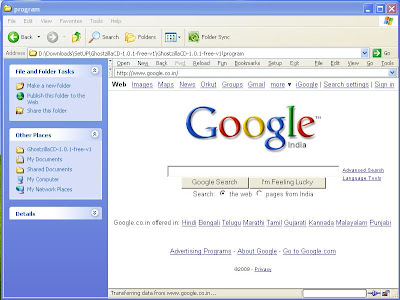
Ghostzilla embeded in explorer window.
For getting a hand full of options and short keys read Instructions.html in the downloaded zip. Remember one thing if you brows with Ghostzilla history and usage details can be tracked as with other browsers, this browser is only meant for hiding what you doing in your screen (huh are you still browsing??)
Ghostzilla browser for Windows is a tool that shields you from the looks of people around you, when they try to see if you are surfing the Web. With Ghostzilla, they see your normal work screen. You see the Web page, drawn to appear inside your work application and to look like that application to a bystander. If someone comes too close, move the mouse away from the Web page and it disappears, leaving the original application frame.
If you wanna try this follow the below steps,
1. Download it from here.
2. Extract the downloaded GhostzillaCD-1.0.1-free-v1.zip
3. Run the Start-Ghostzilla-CD.exe from the path \GhostzillaCD-1.0.1-free-v1\program\
4. Press No in the dialog shown.
5. You can see GhostZilla browser displayed and embeded in topmost window.
6. If it is disappeared, do the following to make it visible
- Click the left most edge of your screen
- Now click the right most edge of your screen
- Now click the left most edge of the screen again. Ahh it is displayed !
7. For hiding the Ghostzilla just move your mouse away from the Ghostzilla.
8. By default it will appear black&white(to have privacy), to have color view choose Setup->Hiding Level 1 menu.

Ghostzilla embeded in explorer window.
For getting a hand full of options and short keys read Instructions.html in the downloaded zip. Remember one thing if you brows with Ghostzilla history and usage details can be tracked as with other browsers, this browser is only meant for hiding what you doing in your screen (huh are you still browsing??)
Saturday, July 25, 2009
Fixing MSMQ re installation issue
Have you ever got the below error when you try to install MSMQ ?
Error Code: 0x42C Error Description: The dependency service or group failed to start.
How To Fix ?
For fixing this issue we need to make sure that all the depended services of MSMQ service should be started.
Following are the depended services of MSMQ in various operating system.
Windows XP
* Distributed Transaction Coordinator
* Message Queuing access control
* NT LM Security Support Provider
* Reliable Multicast Protocol Driver
* Remote Procedure Call (RPC)
* Security Accounts Manager
Windows 2003 server
* Message Queuing access control
* NT LM Security Support Provider
* Remote Procedure Call (RPC)
* RMCAST (Pgm) Protocol Driver
* Security Accounts Manager
Windows Vista
* Message Queuing access control
* Remote Procedure Call (RPC)
* Windows Event Log
For starting a service,
1. Right click on "My Computer" and select "Manage"
2. Select "Services and Applications" in left pane and Select "Services" right pane.
3. Right click and "start" the needed service. For disabled services you need to change it to Automatic/Manual before Starting
Now Start the depended service and try installing MSMQ again.
Error Code: 0x42C Error Description: The dependency service or group failed to start.
How To Fix ?
For fixing this issue we need to make sure that all the depended services of MSMQ service should be started.
Following are the depended services of MSMQ in various operating system.
Windows XP
* Distributed Transaction Coordinator
* Message Queuing access control
* NT LM Security Support Provider
* Reliable Multicast Protocol Driver
* Remote Procedure Call (RPC)
* Security Accounts Manager
Windows 2003 server
* Message Queuing access control
* NT LM Security Support Provider
* Remote Procedure Call (RPC)
* RMCAST (Pgm) Protocol Driver
* Security Accounts Manager
Windows Vista
* Message Queuing access control
* Remote Procedure Call (RPC)
* Windows Event Log
For starting a service,
1. Right click on "My Computer" and select "Manage"
2. Select "Services and Applications" in left pane and Select "Services" right pane.
3. Right click and "start" the needed service. For disabled services you need to change it to Automatic/Manual before Starting
Now Start the depended service and try installing MSMQ again.
Wednesday, June 17, 2009
Restore your Windows system
Have you ever caught up with a situation, that you have installed something or did some manual registry edits and result in an unrecoverable situation? This may be due to - registry got corrupted or some other registration errors. In such a situation, most of us may go for some trials to get rid of the issues facing and if found unsuccessful, end up in deciding reinstalling windows. But you have to understand about the System Restore tool (Start->Programs->Accessories->System Tools->System Restore) supplied with Windows Accessories from Windows XP and later versions.
System Restore


System Restore
System Restore helps you restore your computer's system files to an earlier point in time. It's a way to undo system changes to your computer without affecting your personal files, such as e‑mail, documents, or photos.
If the installation of a program or a driver cause an unexpected change to your computer or cause Windows to behave unpredictably. Usually, uninstalling the program or driver corrects the problem. If uninstalling does not fix the problem, you can try restoring your computer's system to an earlier date when everything worked correctly.
System Restore uses a feature called System Protection to regularly create and save restore points on your computer. These restore points contain information about registery settings and other system information that Windows uses. You can also create restore points manually.
System Restore is not intended for backing up personal files, so it cannot help you recover a personal file that has been deleted or damaged. You should regularly back up your personal files and important data using a backup program.
If the installation of a program or a driver cause an unexpected change to your computer or cause Windows to behave unpredictably. Usually, uninstalling the program or driver corrects the problem. If uninstalling does not fix the problem, you can try restoring your computer's system to an earlier date when everything worked correctly.
System Restore uses a feature called System Protection to regularly create and save restore points on your computer. These restore points contain information about registery settings and other system information that Windows uses. You can also create restore points manually.
System Restore is not intended for backing up personal files, so it cannot help you recover a personal file that has been deleted or damaged. You should regularly back up your personal files and important data using a backup program.
See the below steps in Windows Vista showing Restoring to a previous point

.

.

Subscribe to:
Posts (Atom)


 Posts
Posts